
Webflow Page Speed Optimization: Complete Performance Guide Today

If you're using Webflow to build high-performance sites for clients or your own brand, mastering Webflow Page Speed Optimization is the single most valuable skill you can acquire.

Webflow Page Speed Optimization: Complete Performance Guide Today

Table of contents:

See more
Webflow page Speed Optimization

In today's competitive digital landscape, speed isn't just a luxury, it’s a fundamental requirement for success. For Webflow designers and developers, the platform offers unparalleled creative freedom, but that power comes with the responsibility of ensuring high performance. A beautiful website that takes too long to load is simply a liability.

Google has made it crystal clear: page speed is a ranking factor, heavily weighted through its Core Web Vitals metrics. Slow loading times directly correlate with frustrating user experiences and high bounce rates. 

Did you know that a 1-second delay in mobile load time can impact conversion rates by up to 20%? Furthermore, research indicates that over 90% of US mobile web experiences fail to meet Google’s recommended standards for load speed.

If you're using Webflow to build high-performance sites for clients or your own brand, mastering Webflow Page Speed Optimization is the single most valuable skill you can acquire. This comprehensive guide will transform your sites from visually stunning to lightning-fast, ensuring you crush the Core Web Vitals and climb the SERP rankings.

Key Takeaways

  • Core Web Vitals are Google's definitive speed measurement metrics.
  • The primary culprits for slow Webflow sites are unoptimized images and excessive DOM elements.
  • Leverage Webflow's native features like lazy loading and asset minification for quick wins.
  • Third-party scripts and complex Lottie animations require meticulous management to prevent slowdowns.
  • Consistently achieving a high LCP score is critical for both SEO and user experience.
  • Testing tools like PageSpeed Insights should be used as diagnostic, not punitive, resources.

Take your website design to the next level with our stunning collection of Webflow templates. making them more manageable

Why Webflow Performance Matters: Understanding Core Vitals

Before diving into the optimization mechanics, it’s vital to understand the target. Page speed is the measure of how quickly content on your page loads and becomes interactive for the user. Webflow's excellent hosting infrastructure provides a strong foundation, but the heavy lifting comes down to your build methodology.
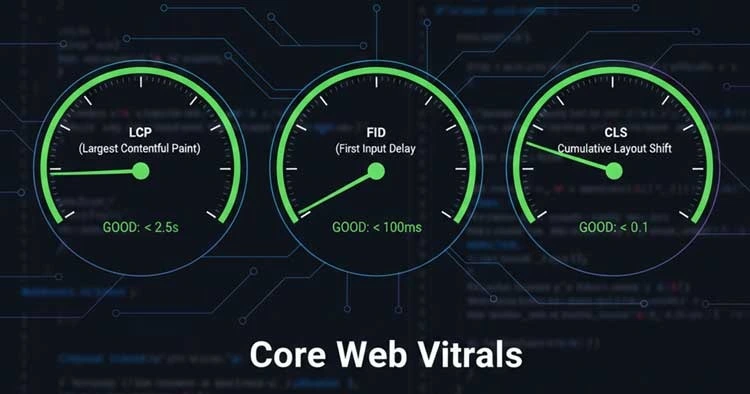
Google's assessment of speed is formalized through Core Web Vitals, three specific metrics that quantify the user experience:

  1. Largest Contentful Paint (LCP): Measures how quickly the main content (e.g., a hero image or large block of text) on the page loads. A good LCP score should be 2.5 seconds or less.
  2. First Input Delay (FID) / Interaction to Next Paint (INP): Measures the time from when a user first interacts with a page (e.g., clicking a link or button) to the time the browser begins processing the response. (FID is being replaced by INP, which measures overall responsiveness, with a target of less than 200 milliseconds).
  3. Cumulative Layout Shift (CLS): Measures the visual stability of the page. Do elements unexpectedly jump around while the page is loading? A CLS score should be 0.1 or less.

Webflow's architecture is inherently fast, but complex designs often introduce speed bottlenecks. The goal of Webflow Page Speed Optimization is to proactively address these bottlenecks, ensuring your site delivers an excellent experience that meets Google’s benchmarks.

The Definitive Guide to Webflow Page Speed Optimization

Achieving top-tier performance on Webflow requires a systematic approach. We break down the process into actionable steps, focusing on the most common performance drains.
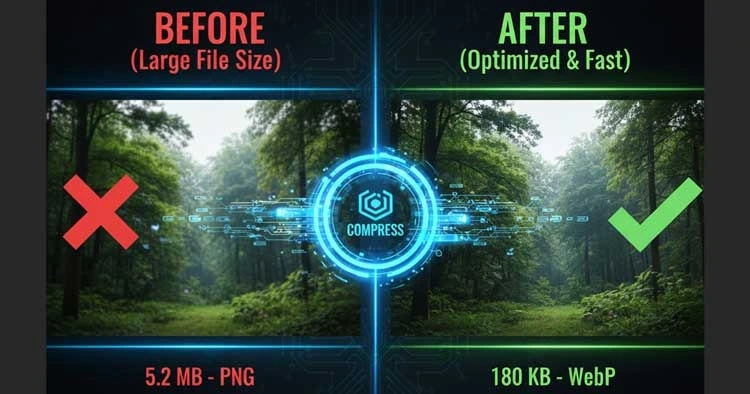
1. Mastering Image Compression and Next-Gen Formats

Images are, statistically, the biggest contributor to page bloat. Unoptimized photography can cripple your LCP score.

The optimization begins before you upload:

  • Size it Right: Never upload a 5000px image and let the browser scale it down. Crop and size images to the maximum dimensions they will actually display on the largest breakpoint.
  • Next-Gen Formats: Use external tools to convert images to modern formats like WebP which offer superior compression.
  • Webflow's Native Optimization: When you upload a JPG or PNG, Webflow automatically optimizes and serves responsive images using the <picture> element. Always rely on this native feature over custom code solutions. (Internal Link Suggestion: [Learn more about Webflow Image Optimization Best Practices here]).

2. Efficient Font Loading and Custom Code Snippets

Fonts can cause a "Flash of Unstyled Text" (FOUT) or "Flash of Invisible Text" (FOIT), negatively impacting the CLS.

  • Prioritize System Fonts: Use system fonts whenever possible. If custom fonts are necessary, limit the number of font families and weights.
  • Font-Display Swap: Configure your custom fonts to use the font-display: swap CSS property. This tells the browser to display a fallback system font immediately and swap it with the custom font once it's loaded, minimizing the impact on LCP.
  • Code in the Footer: For custom JavaScript snippets (like analytics or third-party widgets), place them in the </body> closing tag section rather than the <head>. This prevents render-blocking, allowing the visual content to load first.

3. The Power of Webflow’s Native Lazy Loading

Lazy loading ensures that images outside the user's viewport (below the fold) are not loaded until they are about to scroll to them.

  • Webflow Default: Webflow automatically applies lazy loading to most images, using the loading="lazy" attribute.
  • LCP Consideration: For the LCP-defining element (usually the hero image), you must ensure it is not lazy loaded. You can sometimes override the automatic lazy load by adding specific custom attributes to the LCP element.

4. Optimizing Lottie and Complex Interactions for Speed

Lottie animations and complex interactions built with Webflow are powerful but can be resource-intensive, often spiking the FID/INP score.

  • Lottie File Size: Keep Lottie files under 500 KB. Use Lottie optimization tools to compress the JSON file before uploading.
  • Interaction Triggers: Use interactions that trigger on scroll into view rather than on page load. This defers the processing cost until the user actively engages with that part of the page.

5. Minifying CSS, HTML, and JavaScript (Built-in Webflow Tools)

Minification removes unnecessary characters (spaces, comments, line breaks) from code files without changing their functionality, significantly reducing file size.

  • Webflow's Automatic Minification: Webflow handles the Webflow CSS minification and JavaScript minification automatically upon publishing.
  • Custom Code: If you use custom CSS or JS, ensure you minify it using an external tool before pasting it into the Webflow project settings. (Internal Link Suggestion: [Read our detailed guide on Custom Code Implementation in Webflow]).

6. Strategic Use of Webflow's Global CDN and Hosting

Webflow’s hosting is inherently high-performance, utilizing Amazon Web Services (AWS) and a global Content Delivery Network (CDN) powered by Fastly.

  • CDN Advantage: The CDN geographically distributes copies of your static assets. When a user requests your site, the assets are delivered from the nearest server, drastically reducing server response time. This is a major factor in improving your LCP score. (Internal Link Suggestion: [Why Webflow Hosting Performance is a Game Changer]).

7. Auditing and Pruning Unused Elements and Bloat

One of the easest ways to sabotage Webflow Page Speed Optimization is by leaving "ghost" elements and styles in the project.

  • Styles Cleanup: Regularly go through the Style Manager panel and use the "Clean Up" button to remove unused classes. Unused CSS adds unnecessary weight.
  • Reduce DOM Elements: Every Webflow element you add contributes to the Document Object Model (DOM elements). An overly deep DOM (over 1,500 elements is problematic) directly slows down the browser's rendering time. Audit your project and use simple Div Blocks and grids instead of complex nested structures where possible.

8. Improving Server Response Time with Regional Hosting

While Webflow's global CDN is excellent, for certain target markets, optimizing the regional delivery can help.

  • Webflow Hosting Performance: The platform’s architecture is designed for speed. Your focus must be on the client-side optimization methods listed above, as they provide the biggest tangible gains for your users.

9. Testing and Iterating: Tools for Measuring Core Web Vitals

Optimization is not a one-time task; it's a process of continuous iteration informed by data.

  • Google PageSpeed Insights: The definitive tool. Focus on the Field Data (real-world user experience) over Lab Data, and address the listed opportunities/diagnostics.
  • GTmetrix: Provides a Waterfall chart that visually shows you which assets are taking the longest to load, helping you pinpoint the exact bottleneck.
  • Webflow Audit Tool: Use Webflow's native audit panel (available in Designer) to catch simple errors like missing alt tags and non-optimized images.

Advanced Webflow Speed Strategies and Common Pitfalls to Avoid

Even with the fundamentals covered, advanced Webflow projects require meticulous attention to detail.

Pitfall: Over-Reliance on Third-Party Scripts

External scripts (calendars, chat widgets, specialized analytics) are the hidden killers of performance.

Advanced Strategy: Use a tool like Google Tag Manager to load scripts asynchronously, or set them to load with a delay after the page has visually finished loading (deferring the load). The goal is to prevent these scripts from competing with your LCP content.

Pitfall: Neglecting the Client-First Approach

Unorganized or inconsistent class naming and structuring lead to bloat that is impossible to maintain.

Advanced Strategy: Adopt a system like Client-First or BEM. These structured approaches drastically reduce redundant CSS and simplify the management of complex Webflow builds, minimizing file size and speeding up rendering. (Internal Link Suggestion: [Explore the benefits of structured Webflow development]).

Advanced Strategy: Pre-connecting Required Origins

For third-party services you absolutely need (like a Typekit font server or a marketing platform), use the <link rel="preconnect"> and <link rel="dns-prefetch"> tags in the <head> of your custom code. This tells the browser to establish a connection with the server before it actually needs the resource, reducing latency.

Template Recommendation: Starting with Speed

One of the fastest ways to guarantee a performance baseline is to start with a professionally built and optimized template. Brandbes designs templates with the highest standards of code quality and speed in mind. Here are five of our recommended, high-performance Webflow templates that give you a head start on Core Web Vitals:

Drolix - Donation & Charity Website Template
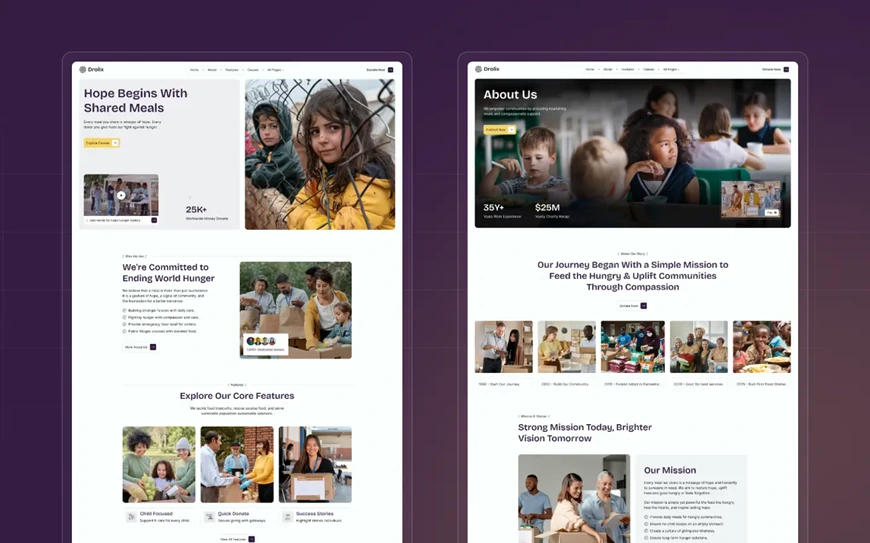
Drolix - Donation & Charity Website Template

Drolix is a clean, structure-first template specifically designed for nonprofit and charity organizations. It ensures lightning-fast loading speed and optimal accessibility, which is crucial for maximizing donation form conversions. This donation template provides a reliable, high-performance starting point for any mission-driven online presence.

Artimg - AI Image & Video Generator Website Template
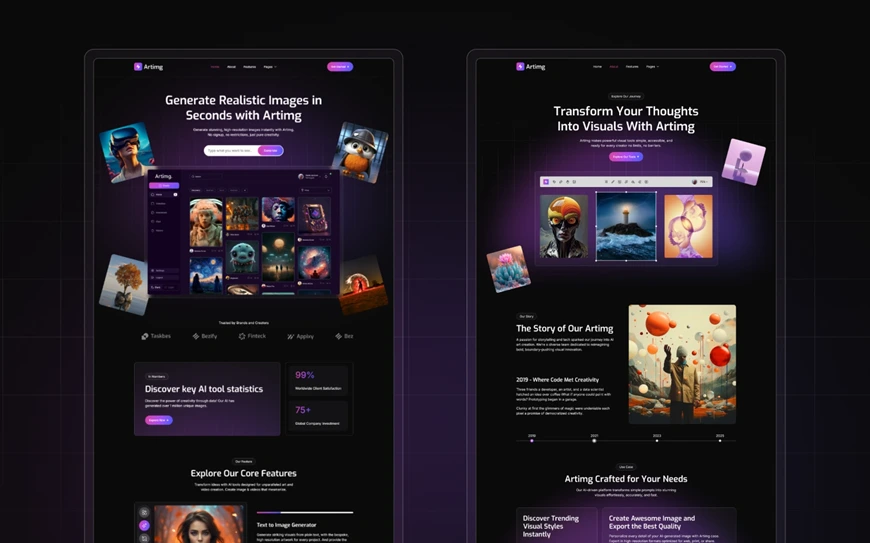
Artimg - AI Image & Video Generator Website Template

Built specifically for AI Image and high-resolution media platforms, Artimg expertly handles large asset displays without compromising speed. It utilizes optimal Webflow image optimization techniques to maintain visual quality while delivering fast gallery experiences. This is the ideal choice for creatives needing a performance-focused showcase.

Dojeen - Clothing Website Template

Dojeen - Clothing Website Template

Dojeen is a light, minimal, and modern corporate template focusing on a clean aesthetic and immediate visual loading. Its low complexity and clean code guarantee a quick LCP score, making a professional first impression in under two seconds. Choose Dojeen to convey trustworthiness and efficiency right from the landing page.

Adlivo - Facebook Ad Agency Website Template
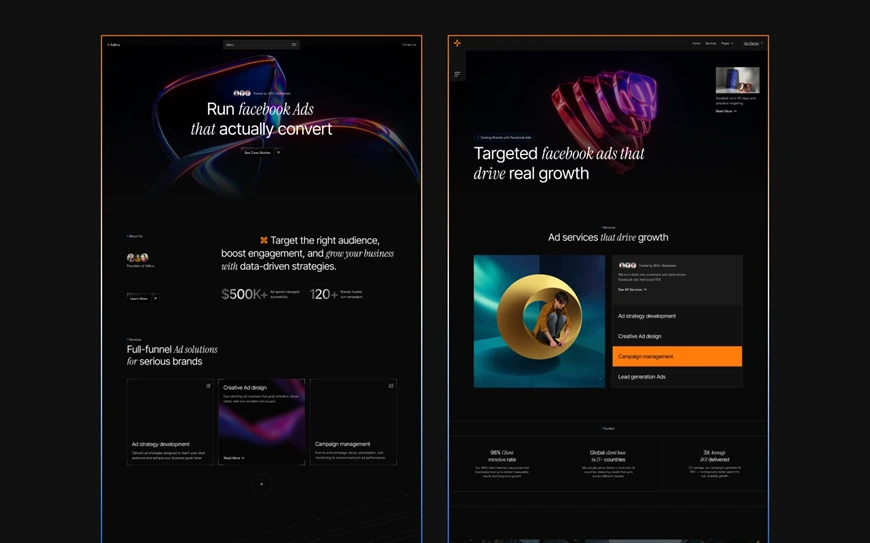
Asuric - Insurance Agency Website Template

Adlivo features a sleek, dark-mode interface built with careful consideration for complex animations and font-loading strategies. It manages dynamic elements efficiently, ensuring smooth scrolling and minimal cumulative layout shift (CLS). It is perfect for agencies or services that require a visually impactful, yet highly optimized, site.

Asuric - Insurance Agency Website Template

Asuric - Insurance Agency Website Template

Asuric is a robust, corporate template structured with a low DOM element count to ensure maximum performance across all service and CMS pages. Designed specifically for insurance and financial agencies, it provides a stable, fast foundation necessary for building client trust. This template helps achieve a high Core Web Vitals score across the entire site.

View all Brandbes Webflow Templates for a high-speed starting point.

Take your website design to the next level with our stunning collection of Webflow templates. making them more manageable

Frequently Asked Questions

What tools are essential for speed analysis?

The most essential tools are Google PageSpeed Insights and GTmetrix for deep-dive diagnostics and Waterfall analysis.

How does Webflow handle image optimization?

Webflow automatically optimizes, compresses, and serves responsive images using the <picture> element and native lazy loading.

What is a good LCP score for a Webflow site?

A good Largest Contentful Paint (LCP) score, according to Google's standard, is 2.5 seconds or less.

Should I use custom code for page speed?

Custom code should be used sparingly, primarily for deferring third-party scripts or fine-tuning the loading order of fonts and LCP elements.

Is Webflow’s hosting performance sufficient?

Yes, Webflow's hosting via AWS and its global CDN is world-class; almost all speed issues arise from site-specific design choices.

Conclusion

Achieving elite Webflow Page Speed Optimization is a competitive advantage that directly impacts your bottom line. By systematically focusing on image size, managing the DOM, deferring render-blocking resources, and leveraging Webflow’s native performance features, you can consistently deliver websites that score in the green on Core Web Vitals. 

Remember, speed is a feature, and in the world of SEO, it's a non-negotiable one. Start optimizing your Webflow project today. Your users and search rankings will thank you for it.

Need a partner to audit your current Webflow project?

Table of contents:

See more
Webflow page Speed Optimization

In today's competitive digital landscape, speed isn't just a luxury, it’s a fundamental requirement for success. For Webflow designers and developers, the platform offers unparalleled creative freedom, but that power comes with the responsibility of ensuring high performance. A beautiful website that takes too long to load is simply a liability.

Google has made it crystal clear: page speed is a ranking factor, heavily weighted through its Core Web Vitals metrics. Slow loading times directly correlate with frustrating user experiences and high bounce rates. 

Did you know that a 1-second delay in mobile load time can impact conversion rates by up to 20%? Furthermore, research indicates that over 90% of US mobile web experiences fail to meet Google’s recommended standards for load speed.

If you're using Webflow to build high-performance sites for clients or your own brand, mastering Webflow Page Speed Optimization is the single most valuable skill you can acquire. This comprehensive guide will transform your sites from visually stunning to lightning-fast, ensuring you crush the Core Web Vitals and climb the SERP rankings.

Key Takeaways

  • Core Web Vitals are Google's definitive speed measurement metrics.
  • The primary culprits for slow Webflow sites are unoptimized images and excessive DOM elements.
  • Leverage Webflow's native features like lazy loading and asset minification for quick wins.
  • Third-party scripts and complex Lottie animations require meticulous management to prevent slowdowns.
  • Consistently achieving a high LCP score is critical for both SEO and user experience.
  • Testing tools like PageSpeed Insights should be used as diagnostic, not punitive, resources.

Take your website design to the next level with our stunning collection of Webflow templates. making them more manageable

Why Webflow Performance Matters: Understanding Core Vitals

Before diving into the optimization mechanics, it’s vital to understand the target. Page speed is the measure of how quickly content on your page loads and becomes interactive for the user. Webflow's excellent hosting infrastructure provides a strong foundation, but the heavy lifting comes down to your build methodology.

Google's assessment of speed is formalized through Core Web Vitals, three specific metrics that quantify the user experience:

  1. Largest Contentful Paint (LCP): Measures how quickly the main content (e.g., a hero image or large block of text) on the page loads. A good LCP score should be 2.5 seconds or less.
  2. First Input Delay (FID) / Interaction to Next Paint (INP): Measures the time from when a user first interacts with a page (e.g., clicking a link or button) to the time the browser begins processing the response. (FID is being replaced by INP, which measures overall responsiveness, with a target of less than 200 milliseconds).
  3. Cumulative Layout Shift (CLS): Measures the visual stability of the page. Do elements unexpectedly jump around while the page is loading? A CLS score should be 0.1 or less.

Webflow's architecture is inherently fast, but complex designs often introduce speed bottlenecks. The goal of Webflow Page Speed Optimization is to proactively address these bottlenecks, ensuring your site delivers an excellent experience that meets Google’s benchmarks.

The Definitive Guide to Webflow Page Speed Optimization

Achieving top-tier performance on Webflow requires a systematic approach. We break down the process into actionable steps, focusing on the most common performance drains.

1. Mastering Image Compression and Next-Gen Formats

Images are, statistically, the biggest contributor to page bloat. Unoptimized photography can cripple your LCP score.

The optimization begins before you upload:

  • Size it Right: Never upload a 5000px image and let the browser scale it down. Crop and size images to the maximum dimensions they will actually display on the largest breakpoint.
  • Next-Gen Formats: Use external tools to convert images to modern formats like WebP which offer superior compression.
  • Webflow's Native Optimization: When you upload a JPG or PNG, Webflow automatically optimizes and serves responsive images using the <picture> element. Always rely on this native feature over custom code solutions. (Internal Link Suggestion: [Learn more about Webflow Image Optimization Best Practices here]).

2. Efficient Font Loading and Custom Code Snippets

Fonts can cause a "Flash of Unstyled Text" (FOUT) or "Flash of Invisible Text" (FOIT), negatively impacting the CLS.

  • Prioritize System Fonts: Use system fonts whenever possible. If custom fonts are necessary, limit the number of font families and weights.
  • Font-Display Swap: Configure your custom fonts to use the font-display: swap CSS property. This tells the browser to display a fallback system font immediately and swap it with the custom font once it's loaded, minimizing the impact on LCP.
  • Code in the Footer: For custom JavaScript snippets (like analytics or third-party widgets), place them in the </body> closing tag section rather than the <head>. This prevents render-blocking, allowing the visual content to load first.

3. The Power of Webflow’s Native Lazy Loading

Lazy loading ensures that images outside the user's viewport (below the fold) are not loaded until they are about to scroll to them.

  • Webflow Default: Webflow automatically applies lazy loading to most images, using the loading="lazy" attribute.
  • LCP Consideration: For the LCP-defining element (usually the hero image), you must ensure it is not lazy loaded. You can sometimes override the automatic lazy load by adding specific custom attributes to the LCP element.

4. Optimizing Lottie and Complex Interactions for Speed

Lottie animations and complex interactions built with Webflow are powerful but can be resource-intensive, often spiking the FID/INP score.

  • Lottie File Size: Keep Lottie files under 500 KB. Use Lottie optimization tools to compress the JSON file before uploading.
  • Interaction Triggers: Use interactions that trigger on scroll into view rather than on page load. This defers the processing cost until the user actively engages with that part of the page.

5. Minifying CSS, HTML, and JavaScript (Built-in Webflow Tools)

Minification removes unnecessary characters (spaces, comments, line breaks) from code files without changing their functionality, significantly reducing file size.

  • Webflow's Automatic Minification: Webflow handles the Webflow CSS minification and JavaScript minification automatically upon publishing.
  • Custom Code: If you use custom CSS or JS, ensure you minify it using an external tool before pasting it into the Webflow project settings. (Internal Link Suggestion: [Read our detailed guide on Custom Code Implementation in Webflow]).

6. Strategic Use of Webflow's Global CDN and Hosting

Webflow’s hosting is inherently high-performance, utilizing Amazon Web Services (AWS) and a global Content Delivery Network (CDN) powered by Fastly.

  • CDN Advantage: The CDN geographically distributes copies of your static assets. When a user requests your site, the assets are delivered from the nearest server, drastically reducing server response time. This is a major factor in improving your LCP score. (Internal Link Suggestion: [Why Webflow Hosting Performance is a Game Changer]).

7. Auditing and Pruning Unused Elements and Bloat

One of the easest ways to sabotage Webflow Page Speed Optimization is by leaving "ghost" elements and styles in the project.

  • Styles Cleanup: Regularly go through the Style Manager panel and use the "Clean Up" button to remove unused classes. Unused CSS adds unnecessary weight.
  • Reduce DOM Elements: Every Webflow element you add contributes to the Document Object Model (DOM elements). An overly deep DOM (over 1,500 elements is problematic) directly slows down the browser's rendering time. Audit your project and use simple Div Blocks and grids instead of complex nested structures where possible.

8. Improving Server Response Time with Regional Hosting

While Webflow's global CDN is excellent, for certain target markets, optimizing the regional delivery can help.

  • Webflow Hosting Performance: The platform’s architecture is designed for speed. Your focus must be on the client-side optimization methods listed above, as they provide the biggest tangible gains for your users.

9. Testing and Iterating: Tools for Measuring Core Web Vitals

Optimization is not a one-time task; it's a process of continuous iteration informed by data.

  • Google PageSpeed Insights: The definitive tool. Focus on the Field Data (real-world user experience) over Lab Data, and address the listed opportunities/diagnostics.
  • GTmetrix: Provides a Waterfall chart that visually shows you which assets are taking the longest to load, helping you pinpoint the exact bottleneck.
  • Webflow Audit Tool: Use Webflow's native audit panel (available in Designer) to catch simple errors like missing alt tags and non-optimized images.

Advanced Webflow Speed Strategies and Common Pitfalls to Avoid

Even with the fundamentals covered, advanced Webflow projects require meticulous attention to detail.

Pitfall: Over-Reliance on Third-Party Scripts

External scripts (calendars, chat widgets, specialized analytics) are the hidden killers of performance.

Advanced Strategy: Use a tool like Google Tag Manager to load scripts asynchronously, or set them to load with a delay after the page has visually finished loading (deferring the load). The goal is to prevent these scripts from competing with your LCP content.

Pitfall: Neglecting the Client-First Approach

Unorganized or inconsistent class naming and structuring lead to bloat that is impossible to maintain.

Advanced Strategy: Adopt a system like Client-First or BEM. These structured approaches drastically reduce redundant CSS and simplify the management of complex Webflow builds, minimizing file size and speeding up rendering. (Internal Link Suggestion: [Explore the benefits of structured Webflow development]).

Advanced Strategy: Pre-connecting Required Origins

For third-party services you absolutely need (like a Typekit font server or a marketing platform), use the <link rel="preconnect"> and <link rel="dns-prefetch"> tags in the <head> of your custom code. This tells the browser to establish a connection with the server before it actually needs the resource, reducing latency.

Template Recommendation: Starting with Speed

One of the fastest ways to guarantee a performance baseline is to start with a professionally built and optimized template. Brandbes designs templates with the highest standards of code quality and speed in mind. Here are five of our recommended, high-performance Webflow templates that give you a head start on Core Web Vitals:

Drolix - Donation & Charity Website Template

Drolix - Donation & Charity Website Template

Drolix is a clean, structure-first template specifically designed for nonprofit and charity organizations. It ensures lightning-fast loading speed and optimal accessibility, which is crucial for maximizing donation form conversions. This donation template provides a reliable, high-performance starting point for any mission-driven online presence.

Artimg - AI Image & Video Generator Website Template

Artimg - AI Image & Video Generator Website Template

Built specifically for AI Image and high-resolution media platforms, Artimg expertly handles large asset displays without compromising speed. It utilizes optimal Webflow image optimization techniques to maintain visual quality while delivering fast gallery experiences. This is the ideal choice for creatives needing a performance-focused showcase.

Dojeen - Clothing Website Template

Dojeen - Clothing Website Template

Dojeen is a light, minimal, and modern corporate template focusing on a clean aesthetic and immediate visual loading. Its low complexity and clean code guarantee a quick LCP score, making a professional first impression in under two seconds. Choose Dojeen to convey trustworthiness and efficiency right from the landing page.

Adlivo - Facebook Ad Agency Website Template

Asuric - Insurance Agency Website Template

Adlivo features a sleek, dark-mode interface built with careful consideration for complex animations and font-loading strategies. It manages dynamic elements efficiently, ensuring smooth scrolling and minimal cumulative layout shift (CLS). It is perfect for agencies or services that require a visually impactful, yet highly optimized, site.

Asuric - Insurance Agency Website Template

Asuric - Insurance Agency Website Template

Asuric is a robust, corporate template structured with a low DOM element count to ensure maximum performance across all service and CMS pages. Designed specifically for insurance and financial agencies, it provides a stable, fast foundation necessary for building client trust. This template helps achieve a high Core Web Vitals score across the entire site.

View all Brandbes Webflow Templates for a high-speed starting point.

Frequently Asked Questions

What tools are essential for speed analysis?

The most essential tools are Google PageSpeed Insights and GTmetrix for deep-dive diagnostics and Waterfall analysis.

How does Webflow handle image optimization?

Webflow automatically optimizes, compresses, and serves responsive images using the <picture> element and native lazy loading.

What is a good LCP score for a Webflow site?

A good Largest Contentful Paint (LCP) score, according to Google's standard, is 2.5 seconds or less.

Should I use custom code for page speed?

Custom code should be used sparingly, primarily for deferring third-party scripts or fine-tuning the loading order of fonts and LCP elements.

Is Webflow’s hosting performance sufficient?

Yes, Webflow's hosting via AWS and its global CDN is world-class; almost all speed issues arise from site-specific design choices.

Conclusion

Achieving elite Webflow Page Speed Optimization is a competitive advantage that directly impacts your bottom line. By systematically focusing on image size, managing the DOM, deferring render-blocking resources, and leveraging Webflow’s native performance features, you can consistently deliver websites that score in the green on Core Web Vitals. 

Remember, speed is a feature, and in the world of SEO, it's a non-negotiable one. Start optimizing your Webflow project today. Your users and search rankings will thank you for it.

Need a partner to audit your current Webflow project?

Table of contents:

See more
Webflow page Speed Optimization

In today's competitive digital landscape, speed isn't just a luxury, it’s a fundamental requirement for success. For Webflow designers and developers, the platform offers unparalleled creative freedom, but that power comes with the responsibility of ensuring high performance. A beautiful website that takes too long to load is simply a liability.

Google has made it crystal clear: page speed is a ranking factor, heavily weighted through its Core Web Vitals metrics. Slow loading times directly correlate with frustrating user experiences and high bounce rates. 

Did you know that a 1-second delay in mobile load time can impact conversion rates by up to 20%? Furthermore, research indicates that over 90% of US mobile web experiences fail to meet Google’s recommended standards for load speed.

If you're using Webflow to build high-performance sites for clients or your own brand, mastering Webflow Page Speed Optimization is the single most valuable skill you can acquire. This comprehensive guide will transform your sites from visually stunning to lightning-fast, ensuring you crush the Core Web Vitals and climb the SERP rankings.

Key Takeaways

  • Core Web Vitals are Google's definitive speed measurement metrics.
  • The primary culprits for slow Webflow sites are unoptimized images and excessive DOM elements.
  • Leverage Webflow's native features like lazy loading and asset minification for quick wins.
  • Third-party scripts and complex Lottie animations require meticulous management to prevent slowdowns.
  • Consistently achieving a high LCP score is critical for both SEO and user experience.
  • Testing tools like PageSpeed Insights should be used as diagnostic, not punitive, resources.

Latest Post

Webflow Page Speed Optimization: Complete Performance Guide Today
Webflow

Webflow Page Speed Optimization: Complete Performance Guide Today

If you're using Webflow to build high-performance sites for clients or your own brand, mastering Webflow Page Speed Optimization is the single most valuable skill you can acquire.

December 11, 2025
5 Best Blog Webflow Templates in 2025
Webflow

5 Best Blog Webflow Templates in 2025

Discover the top 5 Webflow blog templates of 2025—fast, SEO-ready, responsive designs that boost engagement and help you build a stunning content platform.

November 30, 2025
Webflow vs Framer 2025: Which No-Code Design Tool Wins for Your Projects
Webflow

Webflow vs Framer 2025: Which No-Code Design Tool Wins for Your Projects

Struggling to choose between Webflow vs Framer? Get a detailed comparison of features, pricing, templates & performance to make the right decision.

November 13, 2025