
Webflow Hosting vs WordPress Hosting: Full Performance Comparison (2026)

Compare Webflow hosting vs WordPress hosting on speed, security, pricing, and scalability. Data-driven analysis with real benchmarks to help you choose the right platform.

Webflow Hosting vs WordPress Hosting: Full Performance Comparison (2026)

Table of contents:

See more

Webflow hosting is a fully managed, cloud-based solution built on AWS infrastructure with a global Cloudflare CDN, delivering consistent performance without server configuration. WordPress hosting varies widely—from budget shared hosting to premium managed solutions—meaning performance depends heavily on the provider you choose and how well you optimize your setup. The right choice depends on your technical capacity, budget, and performance expectations.

Why Hosting Matters More Than You Think
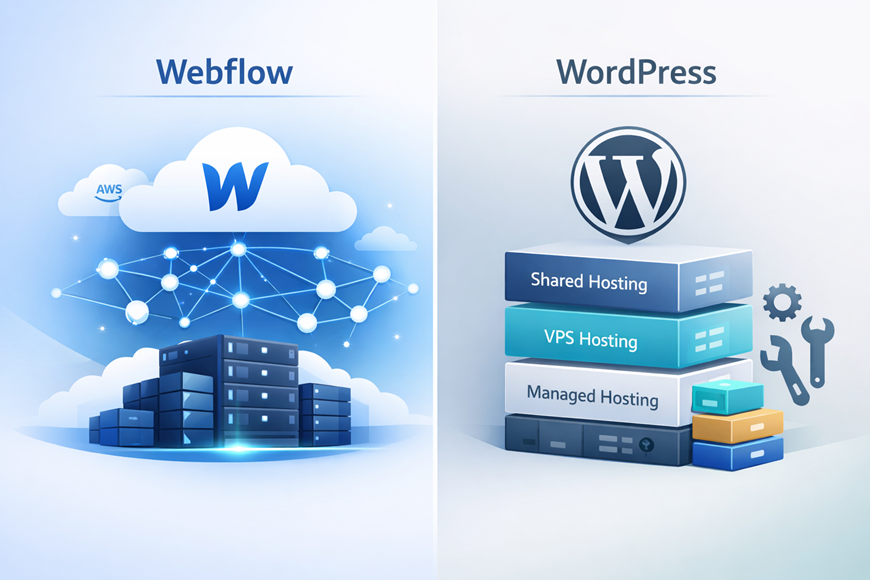
When comparing Webflow hosting vs WordPress hosting, most people focus on the design tools and forget the engine underneath. Hosting directly impacts page speed, SEO rankings, security, and user experience—factors that determine whether visitors stay or leave.

Google has made page speed a confirmed ranking factor through Core Web Vitals metrics. 

Research shows that a 1-second delay in mobile load time can reduce conversions by up to 20%. Additionally, pages that take longer than 3 seconds to load experience a 32% increase in bounce rate.

This article provides a full, data-backed comparison of Webflow and WordPress hosting across performance, pricing, scalability, security, and ease of use. Whether you're a designer, developer, agency, or small business owner, this guide will help you make an informed hosting decision.

Take your website design to the next level with our stunning collection of Webflow templates. making them more manageable

What Is Webflow Hosting?

Webflow hosting is a fully managed hosting solution bundled into the platform. When you publish a site on Webflow, you're automatically deploying to enterprise-grade infrastructure—no separate hosting purchase needed.

Key features include:

  • Built-in Global CDN: Webflow uses a combination of AWS infrastructure and Cloudflare's global CDN to deliver content to 95% of the world in under 50 milliseconds.
  • Managed Infrastructure: All server maintenance, security patches, and software updates are handled by Webflow automatically.
  • Automatic Scaling: Traffic spikes are absorbed without manual intervention. Webflow reports handling 15,000 website publishes per hour across its platform.
  • No Server Configuration: There are no cPanel dashboards, PHP versions, or database settings to manage. Publishing is one click.
  • HTTP/2 and HTTP/3 Support: Modern protocols are enabled by default, improving loading efficiency.
  • Automatic Image Optimization: Webflow compresses and serves images in modern formats like WebP.
  • Enterprise-Grade Security: SOC 2 Type II compliance, free SSL certificates, and global DDoS and bot protection are included on all hosted plans.

Webflow combines the power of AWS with Cloudflare's edge network to deliver 99.99% uptime—a figure that rivals premium enterprise hosting solutions.

What Is WordPress Hosting?

WordPress hosting refers to the server environment where your self-hosted WordPress site lives. Unlike Webflow, WordPress separates the CMS from the hosting layer, meaning you need to choose and manage a hosting provider independently.

WordPress hosting comes in several tiers:

  • Shared Hosting ($3–$15/month): Your site shares server resources with hundreds of other sites. It's the cheapest option but comes with significant performance limitations—load times of 4–8 seconds, PageSpeed scores of 40–60, and uptime as low as 95–98%.
  • VPS Hosting ($20–$150/month): A Virtual Private Server gives you dedicated resources. Performance improves to 1.5–3 second load times with PageSpeed scores of 70–85.
  • Managed WordPress Hosting ($25–$200+/month): Premium providers like WP Engine, Kinsta, and SiteGround handle server optimization, caching, security, and backups. This tier delivers the strongest WordPress performance, with load times of 1–2 seconds and 99.9%+ uptime.
  • Dedicated Hosting ($200+/month): A full server exclusively for your site. Best performance but highest cost, and typically requires technical expertise to manage.

WordPress performance is plugin-dependent. Speed optimization often requires caching plugins (WP Rocket, W3 Total Cache), image compression plugins (ShortPixel, Smush), CDN integration (Cloudflare), and security plugins (Wordfence, Sucuri). Each plugin adds complexity and potential compatibility issues.

Webflow Hosting vs WordPress Hosting – Performance Comparison
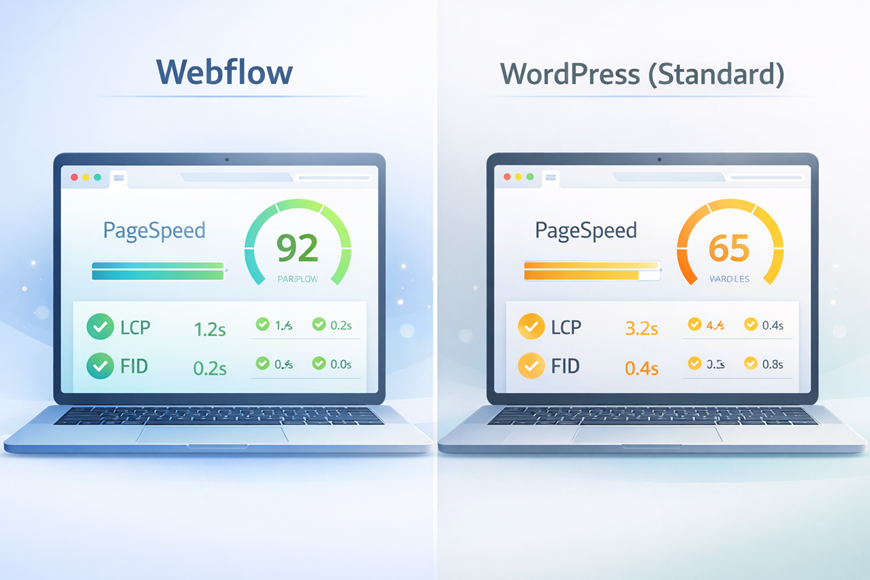
This is where the differences become measurable. Below is a breakdown across five critical performance dimensions.

Page Speed & Core Web Vitals

Independent testing of identical corporate websites on both platforms reveals a consistent performance gap:
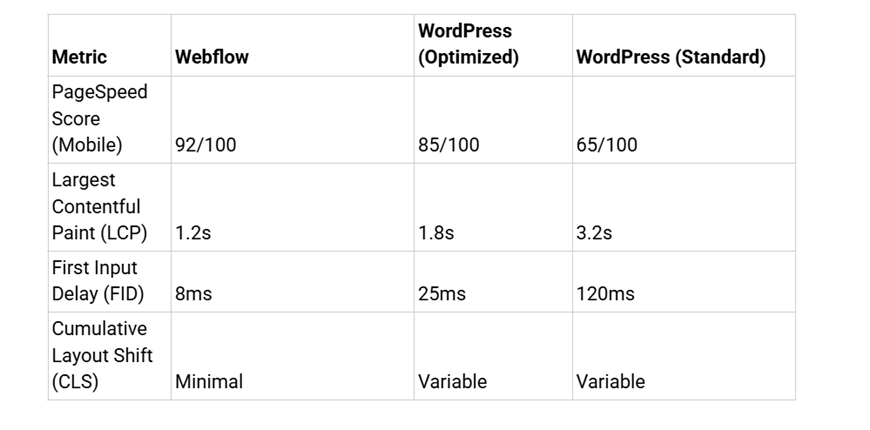
Page Speed & Core Web Vitals

Webflow achieves these scores out of the box because it generates clean, automatically optimized HTML/CSS with built-in minification. WordPress performance depends on theme quality, plugin count, and hosting tier.

A real-world case study illustrates this: a B2B SaaS platform (ScaleSync) optimized its Webflow site and saw LCP drop from 3.9 seconds to 1.6 seconds, bounce rate decrease from 38% to 21%, and Lighthouse performance scores jump from 58 to 96.

Key takeaway: Webflow delivers excellent Core Web Vitals performance by default. WordPress can match these scores, but only with premium hosting, careful plugin selection, and ongoing optimization effort.

Server Infrastructure & CDN
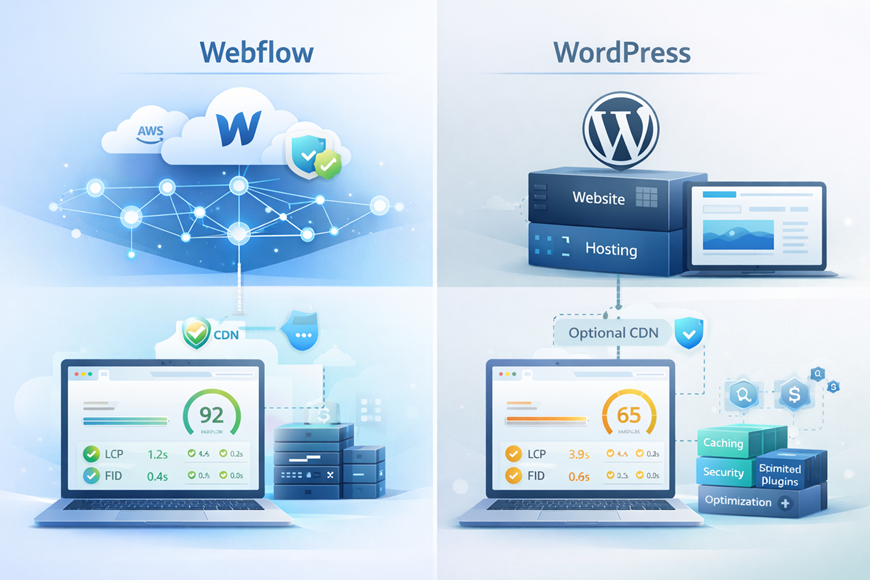
Webflow uses a dual-CDN architecture combining AWS (Amazon CloudFront) and Cloudflare's global network. Every hosted site automatically benefits from edge caching, DDoS mitigation, and optimized SSL/TLS connections. As of 2025, Cloudflare delivers over 98% of all static assets for Webflow-hosted sites from the network edge.

WordPress CDN capability depends entirely on the hosting provider:

  • Shared hosting typically includes no CDN at all.
  • Managed providers like WP Engine integrate their own CDN (global TTFB of 298ms) or third-party solutions.
  • The best WordPress hosting benchmark results show Rocket.net (powered by Cloudflare Enterprise) achieving 177ms global TTFB, and Templ.io at 264ms.
  • Budget hosts like SiteGround delivered among the worst global TTFB scores in 2025 benchmarks.

Webflow's infrastructure advantage is that CDN delivery is automatic and consistent across all paid plans. WordPress users must evaluate CDN options separately—and not all hosting providers include one.

Scalability Under Traffic Spikes
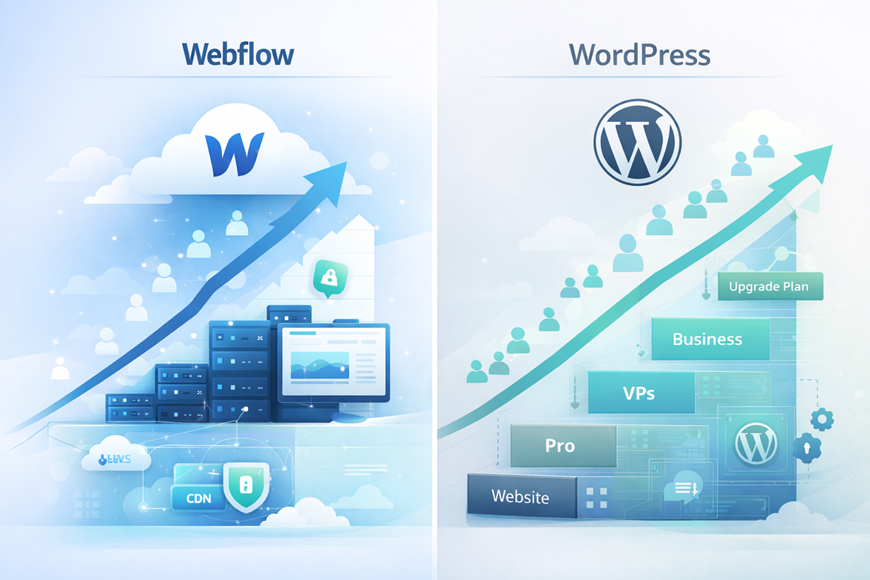
Webflow handles traffic scaling automatically. The platform is built to manage millions of simultaneous visits without requiring plan upgrades or manual server adjustments. Companies like Monday.com, IDEO, and The New York Times use Webflow for high-traffic sites, and the platform can typically handle 100,000+ monthly visits on Business plans without issues.

WordPress scalability depends entirely on your hosting plan:

  • Shared hosting can crash under moderate traffic spikes since resources are shared with other sites on the same server.
  • VPS hosting handles moderate spikes but may require manual scaling or plan upgrades.
  • Managed WordPress hosts like Kinsta and WP Engine offer auto-scaling, but this comes at a premium cost ($30–$200+/month).
  • Dedicated servers handle heavy traffic but require in-house server management expertise.

For businesses expecting growth or viral traffic moments, Webflow's built-in auto-scaling eliminates a common failure point.

Security & Maintenance

Webflow includes security as a core platform feature:

  • Automatic SSL certificates on all plans
  • SOC 2 Type II compliance
  • Global DDoS and bot protection via Cloudflare
  • No plugin vulnerabilities to manage
  • Automatic platform updates with zero user intervention
  • Enterprise-grade security without add-on costs

WordPress security requires active management:

  • SSL certificates may or may not be included (depends on host)
  • Plugin and theme vulnerabilities are the #1 attack vector for WordPress sites
  • Security plugins (Wordfence, Sucuri) are often necessary, adding cost and complexity
  • Core, theme, and plugin updates must be managed regularly
  • Malware scanning and firewall configuration fall on the site owner or hosting provider

Managed WordPress hosting alleviates some of these concerns, but it shifts responsibility rather than eliminating it. With Webflow, security is baked into the platform.

Uptime & Reliability
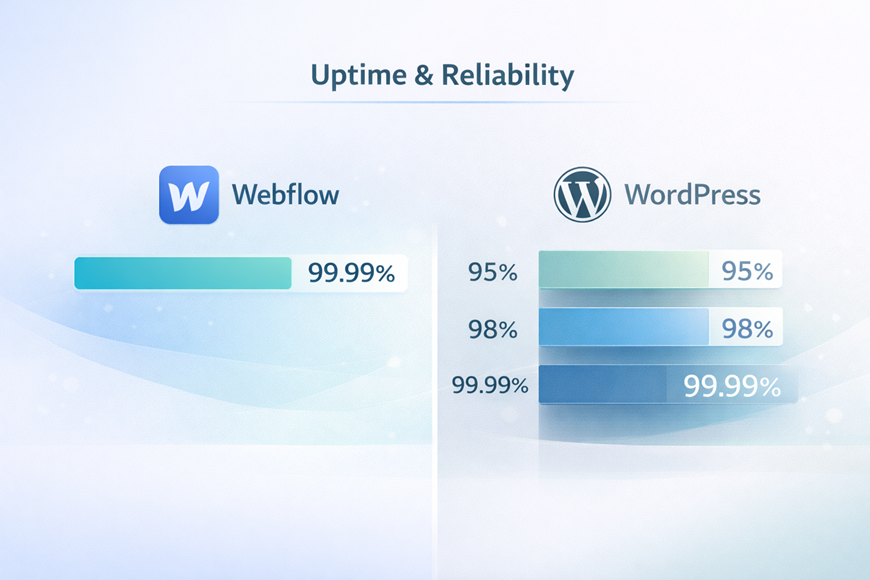
Webflow reports 99.99% hosting uptime, equivalent to roughly 52 minutes of downtime per year. This is backed by their AWS and Cloudflare infrastructure, with automatic failover and global load balancing.

WordPress uptime varies dramatically by hosting provider:
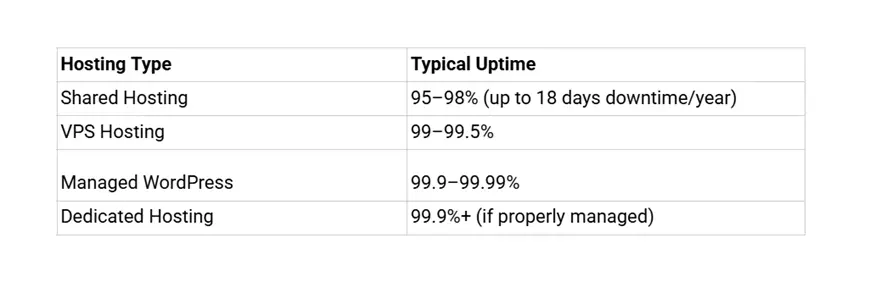
Uptime & Reliability

Budget hosting providers rarely guarantee uptime, and shared hosting environments are especially prone to outages from neighboring sites on the same server.

Pricing Comparison

Understanding the true cost requires looking beyond headline prices. Below is a side-by-side pricing breakdown:
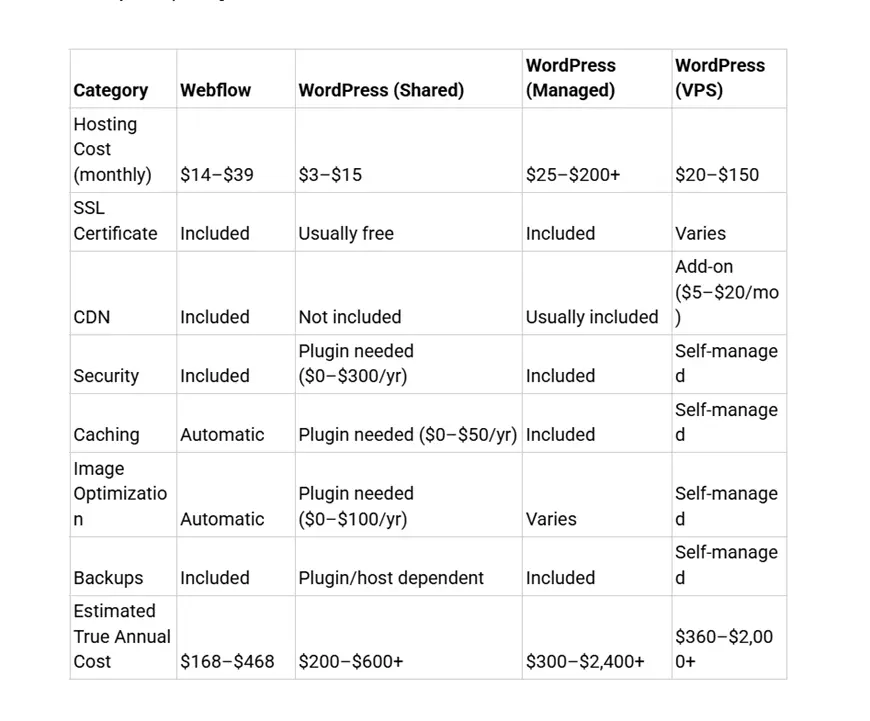
Webflow's pricing appears straightforward because hosting, CDN, SSL, security, and performance optimization are all bundled into the site plan. WordPress has a lower entry price, but hidden costs from plugins, premium themes, CDN services, security tools, and backup solutions add up quickly.

Webflow plan details (billed annually):

  • Basic: $14/month — For landing pages, portfolios, and simple sites (no CMS)
  • CMS: $23/month — For blogs, content-driven sites (50GB bandwidth, 2,000 CMS items)
  • Business: $39/month — For marketing sites with high traffic (100GB bandwidth, 10,000 CMS items)
  • Enterprise: Custom pricing — For high-traffic sites with flexible limits and enterprise-level security

Ease of Setup & Maintenance
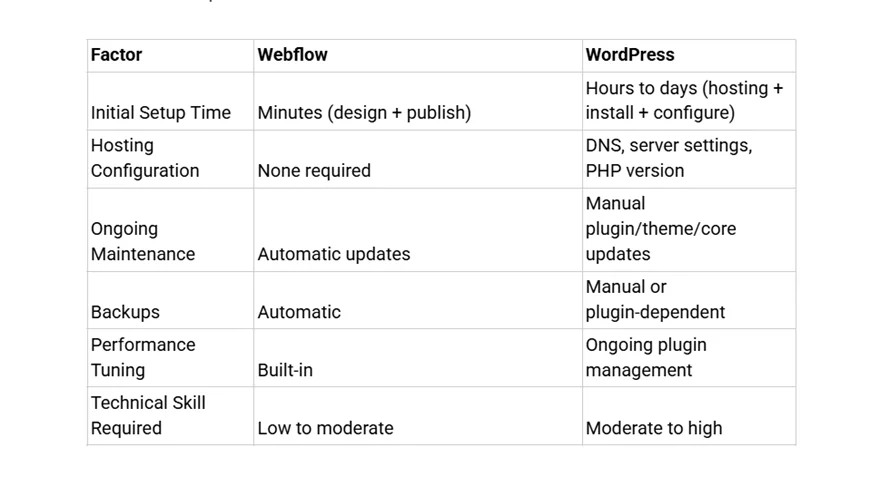
Webflow is significantly more beginner-friendly for hosting. You design your site and click publish—the hosting environment is pre-configured and optimized. There is no need to research hosting providers, configure server settings, or manage update schedules.

WordPress offers more granular control over the hosting stack, which experienced developers appreciate. However, this control comes with ongoing maintenance obligations. Plugin conflicts, PHP version compatibility, and database optimization are recurring tasks that require technical attention.

For agencies managing multiple client sites, Webflow's maintenance-free hosting means less time on operations and more time on design and strategy.

SEO & Performance Impact

Hosting directly influences three Core Web Vitals metrics that Google uses as ranking signals: Largest Contentful Paint (LCP), First Input Delay (FID), and Cumulative Layout Shift (CLS).

Webflow's SEO hosting advantages:

  • Clean, automatically minified code output
  • Built-in caching at the CDN edge
  • Automatic sitemap generation and meta tag controls
  • Free SSL on all plans (a confirmed Google ranking factor)
  • Automatic responsive image serving
  • Server response times under 50ms globally

WordPress SEO hosting challenges:

  • Page speed depends on hosting quality and optimization plugins
  • Caching must be configured separately (plugin + server-level)
  • Multiple plugins can create render-blocking resources
  • Database bloat from revisions, transients, and plugin data slows queries
  • Different hosting tiers produce dramatically different SEO outcomes

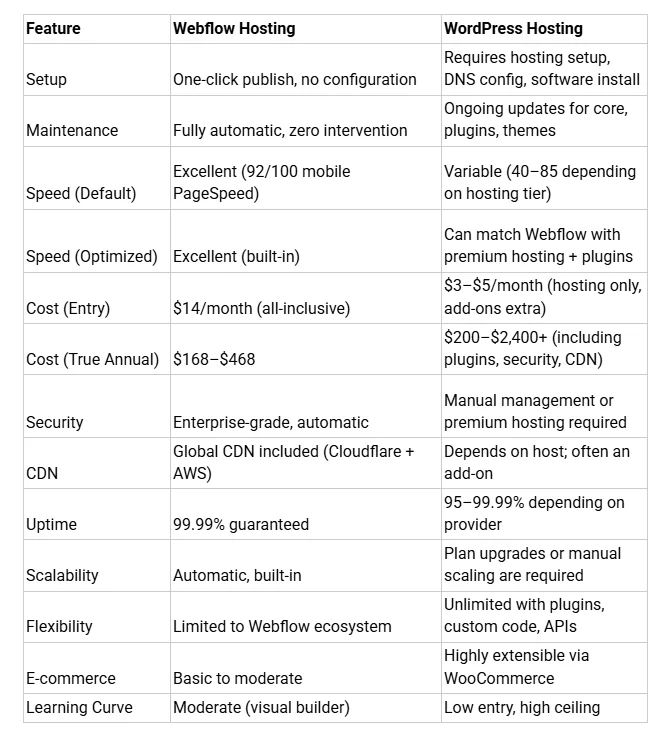
A well-optimized WordPress site on premium managed hosting can compete with Webflow on Core Web Vitals. But achieving and maintaining those scores requires continuous effort, plugin management, and hosting investment that far exceeds Webflow's all-in-one cost.

When to Choose Webflow Hosting

Webflow hosting is the strongest choice when:

  • You're a designer or agency who wants to focus on creative work rather than server management. The platform eliminates DevOps overhead entirely.
  • Your clients need low-maintenance websites that perform well without ongoing technical intervention.
  • You prioritize consistent, fast performance without the variability of choosing and configuring hosting providers.
  • Security and uptime are non-negotiable — Webflow's 99.99% uptime and built-in enterprise security simplify compliance conversations.
  • You're building marketing sites, portfolios, or business websites where the CMS needs are standard and the focus is on speed-to-launch.

Starting with a well-built Webflow template can further accelerate performance. Templates designed with clean structure, optimized assets, and minimal DOM complexity give you a head start on Core Web Vitals scores. 

When WordPress Hosting Makes More Sense

WordPress hosting is the better fit when:

  • You need deep customization through custom PHP, complex database queries, or specialized server configurations that go beyond what a managed platform offers.
  • Your project depends on specific plugins — WordPress's ecosystem of 60,000+ plugins covers niche functionality that no visual builder can replicate.
  • You're building a complex e-commerce operation where WooCommerce's extensibility outweighs Webflow's native e-commerce capabilities.
  • You need a multi-author publishing platform with granular editorial workflows, custom post types, and advanced taxonomy structures.
  • You have an in-house development team capable of managing hosting, security, performance optimization, and ongoing maintenance.
  • Budget is extremely tight — WordPress shared hosting at $3–$5/month is unmatched for absolute minimum viable web presence, though performance trade-offs are significant.

Pros and Cons Summary
Take your website design to the next level with our stunning collection of Webflow templates. making them more manageable

Frequently Asked Questions

Is Webflow hosting faster than WordPress?

In most cases, yes. Webflow delivers faster default performance thanks to its managed AWS + Cloudflare CDN infrastructure, automatic code optimization, and built-in caching. Independent benchmarks show Webflow scoring 92/100 on mobile PageSpeed versus 65/100 for standard WordPress setups. However, a heavily optimized WordPress site on premium managed hosting can narrow this gap significantly.

Does WordPress need managed hosting for good performance?

For competitive Core Web Vitals scores and reliable uptime, managed WordPress hosting is strongly recommended. Shared hosting typically delivers PageSpeed scores between 40 and 60 with load times of 4–8 seconds—far below modern performance expectations. Managed hosts like WP Engine and Kinsta provide server-level caching, CDN integration, and auto-scaling that bring WordPress performance closer to Webflow's baseline.

Is Webflow hosting worth the price?

Yes, when you factor in the total cost of ownership. While Webflow's $14–$39/month plans appear pricier than WordPress shared hosting, the price includes CDN, SSL, security, backups, caching, and automatic scaling. Achieving the same feature set on WordPress typically costs $25–$100+/month when you add premium hosting, security plugins, CDN services, and backup solutions.

Which hosting is better for SEO?

Webflow hosting provides a stronger SEO foundation out of the box, with fast server response times under 50ms, automatic SSL, clean code output, and built-in Core Web Vitals optimization. WordPress can achieve comparable SEO performance, but it requires careful hosting selection, caching configuration, and ongoing plugin management to maintain those standards.

Can WordPress match Webflow's speed?

Yes, but it requires significant investment. With premium managed hosting ($50–$200/month), proper caching plugins, CDN integration, image optimization, and minimal plugin usage, WordPress can achieve PageSpeed scores of 85–95 and LCP times under 2 seconds. The trade-off is higher cost and continuous maintenance compared to Webflow's set-and-forget approach.

Conclusion

The choice between Webflow hosting vs WordPress hosting isn't about which platform is objectively "better", it's about which aligns with your technical capacity, time availability, and performance priorities.

Webflow hosting delivers enterprise-grade performance, security, and reliability as a default state, eliminating the hosting research, configuration, and maintenance burden entirely. You pay a premium for this simplicity, but when you factor in the true cost of achieving comparable WordPress performance, premium hosting, CDN services, security plugins, and developer time, the price difference narrows considerably.

WordPress hosting offers maximum flexibility and the lowest possible entry cost, but this comes with ongoing technical responsibility. If you have the expertise (or budget to hire it), WordPress can deliver outstanding performance. If you don't, the platform's complexity becomes a liability rather than an advantage.​

For designers, agencies, and businesses prioritizing speed-to-market and consistent performance without operational overhead, Webflow hosting provides the strongest value proposition. Starting with a performance-optimized Webflow template from Brandbes gives you an additional head start, combining clean code structure with Webflow's managed infrastructure to achieve excellent Core Web Vitals scores from day one.

The hosting decision shapes everything that follows: your site's performance, your team's workload, your security posture, and ultimately your visitors' experience. Choose the foundation that matches your goals, not just your budget.

Table of contents:

See more

Webflow hosting is a fully managed, cloud-based solution built on AWS infrastructure with a global Cloudflare CDN, delivering consistent performance without server configuration. WordPress hosting varies widely—from budget shared hosting to premium managed solutions—meaning performance depends heavily on the provider you choose and how well you optimize your setup. The right choice depends on your technical capacity, budget, and performance expectations.

Why Hosting Matters More Than You Think

When comparing Webflow hosting vs WordPress hosting, most people focus on the design tools and forget the engine underneath. Hosting directly impacts page speed, SEO rankings, security, and user experience—factors that determine whether visitors stay or leave.

Google has made page speed a confirmed ranking factor through Core Web Vitals metrics. 

Research shows that a 1-second delay in mobile load time can reduce conversions by up to 20%. Additionally, pages that take longer than 3 seconds to load experience a 32% increase in bounce rate.

This article provides a full, data-backed comparison of Webflow and WordPress hosting across performance, pricing, scalability, security, and ease of use. Whether you're a designer, developer, agency, or small business owner, this guide will help you make an informed hosting decision.

Take your website design to the next level with our stunning collection of Webflow templates. making them more manageable

What Is Webflow Hosting?

Webflow hosting is a fully managed hosting solution bundled into the platform. When you publish a site on Webflow, you're automatically deploying to enterprise-grade infrastructure—no separate hosting purchase needed.

Key features include:

  • Built-in Global CDN: Webflow uses a combination of AWS infrastructure and Cloudflare's global CDN to deliver content to 95% of the world in under 50 milliseconds.
  • Managed Infrastructure: All server maintenance, security patches, and software updates are handled by Webflow automatically.
  • Automatic Scaling: Traffic spikes are absorbed without manual intervention. Webflow reports handling 15,000 website publishes per hour across its platform.
  • No Server Configuration: There are no cPanel dashboards, PHP versions, or database settings to manage. Publishing is one click.
  • HTTP/2 and HTTP/3 Support: Modern protocols are enabled by default, improving loading efficiency.
  • Automatic Image Optimization: Webflow compresses and serves images in modern formats like WebP.
  • Enterprise-Grade Security: SOC 2 Type II compliance, free SSL certificates, and global DDoS and bot protection are included on all hosted plans.

Webflow combines the power of AWS with Cloudflare's edge network to deliver 99.99% uptime—a figure that rivals premium enterprise hosting solutions.

What Is WordPress Hosting?

WordPress hosting refers to the server environment where your self-hosted WordPress site lives. Unlike Webflow, WordPress separates the CMS from the hosting layer, meaning you need to choose and manage a hosting provider independently.

WordPress hosting comes in several tiers:

  • Shared Hosting ($3–$15/month): Your site shares server resources with hundreds of other sites. It's the cheapest option but comes with significant performance limitations—load times of 4–8 seconds, PageSpeed scores of 40–60, and uptime as low as 95–98%.
  • VPS Hosting ($20–$150/month): A Virtual Private Server gives you dedicated resources. Performance improves to 1.5–3 second load times with PageSpeed scores of 70–85.
  • Managed WordPress Hosting ($25–$200+/month): Premium providers like WP Engine, Kinsta, and SiteGround handle server optimization, caching, security, and backups. This tier delivers the strongest WordPress performance, with load times of 1–2 seconds and 99.9%+ uptime.
  • Dedicated Hosting ($200+/month): A full server exclusively for your site. Best performance but highest cost, and typically requires technical expertise to manage.

WordPress performance is plugin-dependent. Speed optimization often requires caching plugins (WP Rocket, W3 Total Cache), image compression plugins (ShortPixel, Smush), CDN integration (Cloudflare), and security plugins (Wordfence, Sucuri). Each plugin adds complexity and potential compatibility issues.

Webflow Hosting vs WordPress Hosting – Performance Comparison

This is where the differences become measurable. Below is a breakdown across five critical performance dimensions.

Page Speed & Core Web Vitals

Independent testing of identical corporate websites on both platforms reveals a consistent performance gap:

Page Speed & Core Web Vitals

Webflow achieves these scores out of the box because it generates clean, automatically optimized HTML/CSS with built-in minification. WordPress performance depends on theme quality, plugin count, and hosting tier.

A real-world case study illustrates this: a B2B SaaS platform (ScaleSync) optimized its Webflow site and saw LCP drop from 3.9 seconds to 1.6 seconds, bounce rate decrease from 38% to 21%, and Lighthouse performance scores jump from 58 to 96.

Key takeaway: Webflow delivers excellent Core Web Vitals performance by default. WordPress can match these scores, but only with premium hosting, careful plugin selection, and ongoing optimization effort.

Server Infrastructure & CDN

Webflow uses a dual-CDN architecture combining AWS (Amazon CloudFront) and Cloudflare's global network. Every hosted site automatically benefits from edge caching, DDoS mitigation, and optimized SSL/TLS connections. As of 2025, Cloudflare delivers over 98% of all static assets for Webflow-hosted sites from the network edge.

WordPress CDN capability depends entirely on the hosting provider:

  • Shared hosting typically includes no CDN at all.
  • Managed providers like WP Engine integrate their own CDN (global TTFB of 298ms) or third-party solutions.
  • The best WordPress hosting benchmark results show Rocket.net (powered by Cloudflare Enterprise) achieving 177ms global TTFB, and Templ.io at 264ms.
  • Budget hosts like SiteGround delivered among the worst global TTFB scores in 2025 benchmarks.

Webflow's infrastructure advantage is that CDN delivery is automatic and consistent across all paid plans. WordPress users must evaluate CDN options separately—and not all hosting providers include one.

Scalability Under Traffic Spikes

Webflow handles traffic scaling automatically. The platform is built to manage millions of simultaneous visits without requiring plan upgrades or manual server adjustments. Companies like Monday.com, IDEO, and The New York Times use Webflow for high-traffic sites, and the platform can typically handle 100,000+ monthly visits on Business plans without issues.

WordPress scalability depends entirely on your hosting plan:

  • Shared hosting can crash under moderate traffic spikes since resources are shared with other sites on the same server.
  • VPS hosting handles moderate spikes but may require manual scaling or plan upgrades.
  • Managed WordPress hosts like Kinsta and WP Engine offer auto-scaling, but this comes at a premium cost ($30–$200+/month).
  • Dedicated servers handle heavy traffic but require in-house server management expertise.

For businesses expecting growth or viral traffic moments, Webflow's built-in auto-scaling eliminates a common failure point.

Security & Maintenance

Webflow includes security as a core platform feature:

  • Automatic SSL certificates on all plans
  • SOC 2 Type II compliance
  • Global DDoS and bot protection via Cloudflare
  • No plugin vulnerabilities to manage
  • Automatic platform updates with zero user intervention
  • Enterprise-grade security without add-on costs

WordPress security requires active management:

  • SSL certificates may or may not be included (depends on host)
  • Plugin and theme vulnerabilities are the #1 attack vector for WordPress sites
  • Security plugins (Wordfence, Sucuri) are often necessary, adding cost and complexity
  • Core, theme, and plugin updates must be managed regularly
  • Malware scanning and firewall configuration fall on the site owner or hosting provider

Managed WordPress hosting alleviates some of these concerns, but it shifts responsibility rather than eliminating it. With Webflow, security is baked into the platform.

Uptime & Reliability

Webflow reports 99.99% hosting uptime, equivalent to roughly 52 minutes of downtime per year. This is backed by their AWS and Cloudflare infrastructure, with automatic failover and global load balancing.

WordPress uptime varies dramatically by hosting provider:

Uptime & Reliability

Budget hosting providers rarely guarantee uptime, and shared hosting environments are especially prone to outages from neighboring sites on the same server.

Pricing Comparison

Understanding the true cost requires looking beyond headline prices. Below is a side-by-side pricing breakdown:

Webflow's pricing appears straightforward because hosting, CDN, SSL, security, and performance optimization are all bundled into the site plan. WordPress has a lower entry price, but hidden costs from plugins, premium themes, CDN services, security tools, and backup solutions add up quickly.

Webflow plan details (billed annually):

  • Basic: $14/month — For landing pages, portfolios, and simple sites (no CMS)
  • CMS: $23/month — For blogs, content-driven sites (50GB bandwidth, 2,000 CMS items)
  • Business: $39/month — For marketing sites with high traffic (100GB bandwidth, 10,000 CMS items)
  • Enterprise: Custom pricing — For high-traffic sites with flexible limits and enterprise-level security

Ease of Setup & Maintenance

Webflow is significantly more beginner-friendly for hosting. You design your site and click publish—the hosting environment is pre-configured and optimized. There is no need to research hosting providers, configure server settings, or manage update schedules.

WordPress offers more granular control over the hosting stack, which experienced developers appreciate. However, this control comes with ongoing maintenance obligations. Plugin conflicts, PHP version compatibility, and database optimization are recurring tasks that require technical attention.

For agencies managing multiple client sites, Webflow's maintenance-free hosting means less time on operations and more time on design and strategy.

SEO & Performance Impact

Hosting directly influences three Core Web Vitals metrics that Google uses as ranking signals: Largest Contentful Paint (LCP), First Input Delay (FID), and Cumulative Layout Shift (CLS).

Webflow's SEO hosting advantages:

  • Clean, automatically minified code output
  • Built-in caching at the CDN edge
  • Automatic sitemap generation and meta tag controls
  • Free SSL on all plans (a confirmed Google ranking factor)
  • Automatic responsive image serving
  • Server response times under 50ms globally

WordPress SEO hosting challenges:

  • Page speed depends on hosting quality and optimization plugins
  • Caching must be configured separately (plugin + server-level)
  • Multiple plugins can create render-blocking resources
  • Database bloat from revisions, transients, and plugin data slows queries
  • Different hosting tiers produce dramatically different SEO outcomes

A well-optimized WordPress site on premium managed hosting can compete with Webflow on Core Web Vitals. But achieving and maintaining those scores requires continuous effort, plugin management, and hosting investment that far exceeds Webflow's all-in-one cost.

When to Choose Webflow Hosting

Webflow hosting is the strongest choice when:

  • You're a designer or agency who wants to focus on creative work rather than server management. The platform eliminates DevOps overhead entirely.
  • Your clients need low-maintenance websites that perform well without ongoing technical intervention.
  • You prioritize consistent, fast performance without the variability of choosing and configuring hosting providers.
  • Security and uptime are non-negotiable — Webflow's 99.99% uptime and built-in enterprise security simplify compliance conversations.
  • You're building marketing sites, portfolios, or business websites where the CMS needs are standard and the focus is on speed-to-launch.

Starting with a well-built Webflow template can further accelerate performance. Templates designed with clean structure, optimized assets, and minimal DOM complexity give you a head start on Core Web Vitals scores. 

When WordPress Hosting Makes More Sense

WordPress hosting is the better fit when:

  • You need deep customization through custom PHP, complex database queries, or specialized server configurations that go beyond what a managed platform offers.
  • Your project depends on specific plugins — WordPress's ecosystem of 60,000+ plugins covers niche functionality that no visual builder can replicate.
  • You're building a complex e-commerce operation where WooCommerce's extensibility outweighs Webflow's native e-commerce capabilities.
  • You need a multi-author publishing platform with granular editorial workflows, custom post types, and advanced taxonomy structures.
  • You have an in-house development team capable of managing hosting, security, performance optimization, and ongoing maintenance.
  • Budget is extremely tight — WordPress shared hosting at $3–$5/month is unmatched for absolute minimum viable web presence, though performance trade-offs are significant.

Pros and Cons Summary

Frequently Asked Questions

Is Webflow hosting faster than WordPress?

In most cases, yes. Webflow delivers faster default performance thanks to its managed AWS + Cloudflare CDN infrastructure, automatic code optimization, and built-in caching. Independent benchmarks show Webflow scoring 92/100 on mobile PageSpeed versus 65/100 for standard WordPress setups. However, a heavily optimized WordPress site on premium managed hosting can narrow this gap significantly.

Does WordPress need managed hosting for good performance?

For competitive Core Web Vitals scores and reliable uptime, managed WordPress hosting is strongly recommended. Shared hosting typically delivers PageSpeed scores between 40 and 60 with load times of 4–8 seconds—far below modern performance expectations. Managed hosts like WP Engine and Kinsta provide server-level caching, CDN integration, and auto-scaling that bring WordPress performance closer to Webflow's baseline.

Is Webflow hosting worth the price?

Yes, when you factor in the total cost of ownership. While Webflow's $14–$39/month plans appear pricier than WordPress shared hosting, the price includes CDN, SSL, security, backups, caching, and automatic scaling. Achieving the same feature set on WordPress typically costs $25–$100+/month when you add premium hosting, security plugins, CDN services, and backup solutions.

Which hosting is better for SEO?

Webflow hosting provides a stronger SEO foundation out of the box, with fast server response times under 50ms, automatic SSL, clean code output, and built-in Core Web Vitals optimization. WordPress can achieve comparable SEO performance, but it requires careful hosting selection, caching configuration, and ongoing plugin management to maintain those standards.

Can WordPress match Webflow's speed?

Yes, but it requires significant investment. With premium managed hosting ($50–$200/month), proper caching plugins, CDN integration, image optimization, and minimal plugin usage, WordPress can achieve PageSpeed scores of 85–95 and LCP times under 2 seconds. The trade-off is higher cost and continuous maintenance compared to Webflow's set-and-forget approach.

Conclusion

The choice between Webflow hosting vs WordPress hosting isn't about which platform is objectively "better", it's about which aligns with your technical capacity, time availability, and performance priorities.

Webflow hosting delivers enterprise-grade performance, security, and reliability as a default state, eliminating the hosting research, configuration, and maintenance burden entirely. You pay a premium for this simplicity, but when you factor in the true cost of achieving comparable WordPress performance, premium hosting, CDN services, security plugins, and developer time, the price difference narrows considerably.

WordPress hosting offers maximum flexibility and the lowest possible entry cost, but this comes with ongoing technical responsibility. If you have the expertise (or budget to hire it), WordPress can deliver outstanding performance. If you don't, the platform's complexity becomes a liability rather than an advantage.​

For designers, agencies, and businesses prioritizing speed-to-market and consistent performance without operational overhead, Webflow hosting provides the strongest value proposition. Starting with a performance-optimized Webflow template from Brandbes gives you an additional head start, combining clean code structure with Webflow's managed infrastructure to achieve excellent Core Web Vitals scores from day one.

The hosting decision shapes everything that follows: your site's performance, your team's workload, your security posture, and ultimately your visitors' experience. Choose the foundation that matches your goals, not just your budget.

Table of contents:

See more

Webflow hosting is a fully managed, cloud-based solution built on AWS infrastructure with a global Cloudflare CDN, delivering consistent performance without server configuration. WordPress hosting varies widely—from budget shared hosting to premium managed solutions—meaning performance depends heavily on the provider you choose and how well you optimize your setup. The right choice depends on your technical capacity, budget, and performance expectations.

Why Hosting Matters More Than You Think

When comparing Webflow hosting vs WordPress hosting, most people focus on the design tools and forget the engine underneath. Hosting directly impacts page speed, SEO rankings, security, and user experience—factors that determine whether visitors stay or leave.

Google has made page speed a confirmed ranking factor through Core Web Vitals metrics. 

Research shows that a 1-second delay in mobile load time can reduce conversions by up to 20%. Additionally, pages that take longer than 3 seconds to load experience a 32% increase in bounce rate.

This article provides a full, data-backed comparison of Webflow and WordPress hosting across performance, pricing, scalability, security, and ease of use. Whether you're a designer, developer, agency, or small business owner, this guide will help you make an informed hosting decision.

Latest Post

Webflow Hosting vs WordPress Hosting: Full Performance Comparison (2026)
Webflow

Webflow Hosting vs WordPress Hosting: Full Performance Comparison (2026)

Compare Webflow hosting vs WordPress hosting on speed, security, pricing, and scalability. Data-driven analysis with real benchmarks to help you choose the right platform.

February 18, 2026
5 Best Free Webflow Templates: What They're Good At and When to Go Paid
Webflow

5 Best Free Webflow Templates: What They're Good At and When to Go Paid

Webflow Editor vs Designer Mode explained for 2026. Compare features, workflows, SEO, pricing, and team roles to decide which tool fits designers best.

February 10, 2026
Webflow Editor vs Designer Mode (Which Is Better For Designers?)
Webflow

Webflow Editor vs Designer Mode (Which Is Better For Designers?)

Webflow Editor vs Designer Mode explained for 2026. Compare features, workflows, SEO, pricing, and team roles to decide which tool fits designers best.

January 22, 2026